Every subscription moves through a defined sequence of states. Understanding these states helps you manage billing correctly and build reliable integrations.
Status Reference
| Status | Description |
|---|---|
pending | Created and awaiting initial payment. The first invoice must be paid to activate the subscription. |
active | Live and invoicing on schedule. Paisr generates invoices at each billing interval. |
suspended | Automatic renewal failed. Invoice generation is paused. The latest unpaid invoice must be paid to restore. |
cancelled | Manually stopped or ended by the system. No further invoices are generated and the subscription is locked. |
expired | No payment was made within 24 hours of the subscription being created. |
When a subscription is cancelled or expires, all associated unpaid invoices are automatically voided.
Lifecycle Flow
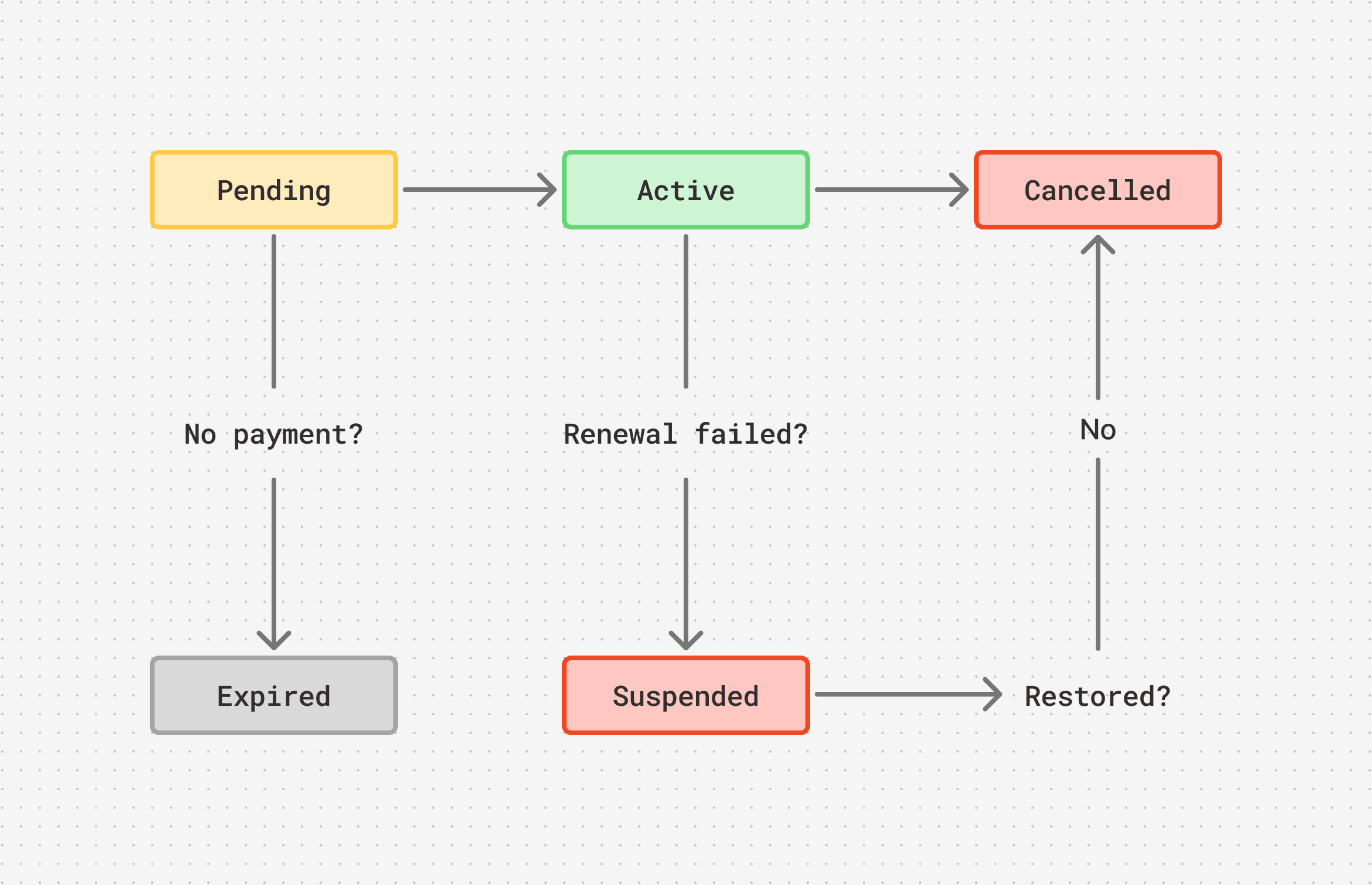
Pending
A subscription enters pending when it is first created. The first invoice is generated immediately and must be paid to activate the subscription. If no payment is received within 24 hours, the subscription moves to expired.
Active
The subscription is live. Paisr generates a new invoice at each billing interval and, if auto_renew is enabled, attempts to charge the customer's saved payment method automatically. If auto_renew is disabled, the invoice is emailed to the customer for manual payment.
Suspended
Suspension is triggered automatically when a renewal invoice cannot be collected because the automatic charge failed. Invoice generation pauses.
To restore a suspended subscription:
- The customer pays the outstanding invoice, or
- You trigger a new payment attempt via the restore endpoint.
If the subscription is not restored before the next billing interval, it is automatically cancelled.
Cancelled
A subscription moves to cancelled when:
- You cancel it manually via the dashboard or API
- It is automatically cancelled after remaining in
suspendedbeyond the next billing interval
Cancellation is final. No further invoices are generated and the subscription is locked. All unpaid invoices are voided immediately.
Expired
A subscription expires if no payment is received on the initial invoice within 24 hours of creation. Expired subscriptions can be deleted but not reactivated — create a new subscription instead.
Webhooks
Use webhooks to react to subscription state changes in real time rather than polling the API. Subscribe to these events:
| Event | Fired when |
|---|---|
subscription.created | A new subscription has been created |
subscription.activated | The subscription moved to active |
subscription.updated | Auto-renewal was toggled |
subscription.suspended | Renewal failed and the subscription was suspended |
subscription.canceled | The subscription was cancelled |
subscription.expired | The subscription expired without an initial payment |
subscription.removed | The subscription was permanently deleted |
Retrieving Subscriptions
List subscriptions with optional filters:
curl -X GET "https://api.live.paisr.tech/v2/subscriptions?status=active&limit=50" \
  -H "Authorization: Bearer <token>" \
  -H "User-Agent: MyApp/1.0"
Retrieve a specific subscription including its line items and billing schedule:
curl -X GET "https://api.live.paisr.tech/v2/subscriptions/{subscription_id}" \
  -H "Authorization: Bearer <token>" \
  -H "User-Agent: MyApp/1.0"