Every payment in Paisr moves through a defined sequence of states from the moment it is initiated to the moment funds reach your wallet. Understanding this lifecycle helps you build reliable integrations and handle edge cases correctly.
Status Reference
| Status | Description |
|---|---|
pending | The payment has been initiated but the customer has not yet completed the payment action (e.g. redirecting to a provider page or scanning a QR code). |
processing | The payment action is complete and the provider is confirming the transaction. |
approved | The payment has been successfully authorised. For linked payments, the associated invoice is marked as paid. |
failed | The payment attempt was declined by the provider or the customer's issuing bank. |
expired | The payment was not completed within the allowed timeframe. |
cancelled | The payment was cancelled before approval. |
refunded | The payment was reversed. For linked payments, the invoice returns to an unpaid state. |
Lifecycle Flow
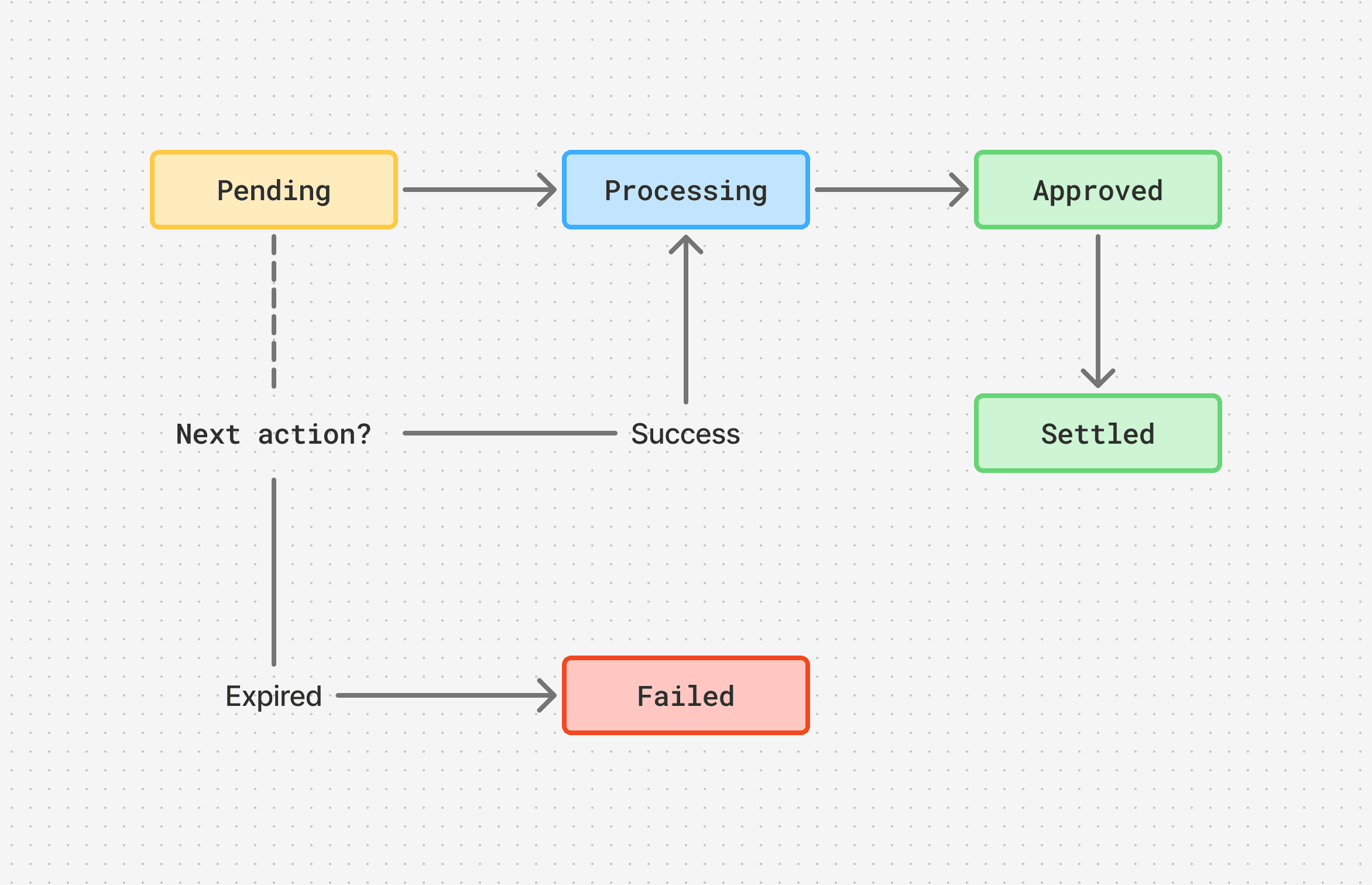
1. Initiation
A payment is created via the Payments API or through the Hosted Checkout. If the response includes a next_action that tells your integration what to do next:
redirect— redirect the customer to the provider's payment page (wallet and bank methods)present_or_trigger— display a QR code or trigger an in-app deep link (QR-based methods)- No next action — the payment settled synchronously (card payments)
2. Pending → Processing
Once the customer completes the required action, the payment moves to processing while the provider confirms the transaction. This can be near-instant or take a few seconds depending on the method.
3. Approval & Settlement
When the provider confirms success, the payment moves to approved. For linked payments, the associated invoice is automatically marked as paid.
Settlement timing depends on the payment method, see the Payment Methods section for details. Funds are credited to your default wallet balance once settlement is confirmed. If your business verification is incomplete, funds are held until verification is approved.
4. Failure & Expiry
A payment moves to failed when the provider or issuing bank declines it. A payment moves to expired if the customer does not complete the payment action within the allowed window. In both cases the payment is closed and a new attempt must be initiated.
5. Refunds
An approved or settled payment can be reversed via a refund. See the Refunds guide for details.
Webhooks
Use webhooks to react to payment state changes in real time rather than polling the API. Subscribe to these events:
| Event | Fired when |
|---|---|
payment.initiated | A new payment has been created |
payment.approved | The payment was authorised |
payment.failed | The payment was declined |
payment.expired | The payment window elapsed |
payment.refunded | A refund was issued |
Monitoring
View the status and full details of any payment from the Payments section in your dashboard, including the amount breakdown, billing details, timestamps, and the payment method used.
curl -X GET "https://api.live.paisr.tech/v2/payments/{payment_id}" \
  -H "Authorization: Bearer <token>" \
  -H "User-Agent: MyApp/1.0"